You may have a vibrant, visually stimulating and feature-rich WordPress website, but if it is not optimized for search engines, it doesn’t really have much value. In fact, search engines don’t really care about the website design or the high definition, attractive images you have put up. All they care about are quality content, alt tags, keywords, good URL structure, and much more.
Fortunately, WordPress is a hassle-free CMS platform which makes it easy to configure almost all the aspects of your website.
A clear sitemap, relevant keywords and good quality content makes it more likely that Google crawlers will rank your website highly on search engines. Conversely, broken links, duplicate content and non-responsive web design can bring your rankings down.
A robust WordPress setup can make it easy for bots to crawl through your webpages and give your business a boost.
Here are some important WordPress SEO tips to apply on your website, which can help to boost your SERP rankings:
Create Well-Structured Permalinks
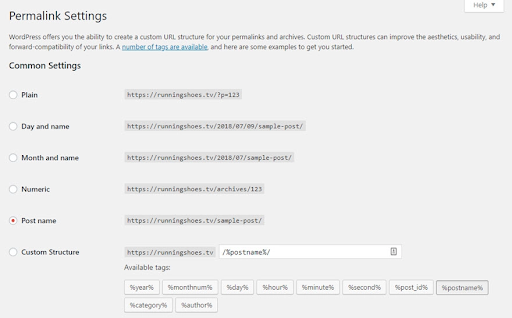
Permanent links or “permalinks” are automatically generated by WordPress. These URLs provide the path or link to the web pages and posts. The default permalink generated by WordPress are numeric and they do not provide any clear or useful information to search engines. For instance,
www.example.com/?p=123
Such a permalink will not do any good for your website to rank higher on search engines. Instead, using clear and descriptive structure that defines the content of the page will make it easier for search engines to understand and boost the ranking of the page.
Long-tail keywords in the permalinks can enhance the search engine rankings. The reason for this is that long-tail keywords are mostly precise and not very competitive. Hence, customizing permalinks is the way forward to ranking higher on SERPs.
Want to quickly find a high volume long tail keyword for your target keyword? Use KeywordTool. It’s free, and it’s quick.

Changing the permalink structure of web pages in WordPress is quite an easy task. Just login to the WordPress website backend, navigate to settings, click on the permalink tab and change it accordingly.
Set-Up Yoast SEO Plugin
This plugin assists you in building an optimized website. The Yoast SEO plugin highlights the problems and provides suggestions to fix them. The plugin settings also give you better control over how your links are displayed.
Here is how Yoast plugin helps in website development:
- Analyses structure of your content by pointing out long sentences and paragraphs, lack of transition words and much more.
- Examines keyword density and provides suggestions to lower or increase it.

- Follows the Flesch-Kincaid Reading Ease formula and suggests changes accordingly. This technique analyses the sentence structure to make sure you are creating readable content.
- Meta descriptions play a major role in ranking your web pages on search engines. The Yoast SEO plugin gives you the place to create your own meta description while simultaneously indicating if it is optimized according to Google algorithms.
- Yoast SEO plugin will warn you if there is a page on your website that has not been updated in the last six months. Because outdated pages can pull the ranking of your website down.
- With the paid version of Yoast SEO plugin, you will not have to be worried about the redirection of a page when you delete it. It easily redirects old URLs to new ones.
- Social Sharing is made easy with Yoast SEO plugin. It has an built-in ability to share information on social media.
XML Sitemap Can Boost Rankings
A sitemap is a must for all WordPress websites. It is a list of all the pages in a website. Hence, sitemaps enable search engines to crawl your website better, as it displays the structure of your website.
Sitemaps enable search engines to crawl all webpages you want to make visible. Higher the number of indexed pages better the visibility of your website.
Sitemaps are not for navigation or internal linking; these are for search engine spiderbots to help your website rank higher in SERPs.
Primarily there are two types of sitemaps:
– HTML
– XML
An HTML sitemap is visible to the site visitors and assists them to navigate to specific pages. HTML sitemaps are known to enhance the user experience. On the other hand, XML sitemaps are preferred by search engines. XML sitemaps make it easier for search engine spiders to crawl them and are often hidden from the website visitors.
Having a sitemap for your website is important, and it really doesn’t matter whether it is generated on HTML or XML format.
But, search engines prefer XML sitemaps, and there is no reason to make things difficult for it.
You can easily generate an XML sitemap for your website by using Google XML Sitemaps. It is an extremely useful WordPress plugin.
Produce High Quality Content And Optimize It
High-quality, relevant content can propel high rankings for WordPress websites, at the same time bad or plagiarized content can cause Google penalties which can be impossible to recover from.
Characteristics of high-quality content:
- Unique – Do not copy anyone else’s work and project it as yours. Google knows all and it will penalize your website for doing so. Topics or ideas can be similar but not the content. If you pick-up something always provide the source instead of claiming it to be yours.
- Credible – If you are sharing a statistic you must acknowledge the source of the data. Factual data is important for developing credible online content.
- Useful and informative – People seek useful and informative content on the internet. If your content educates and informs, it will be considered to have higher quality.
- Error free – Grammatical mistakes can be a turn-off for readers. Therefore, check your content before posting so that it is free of typos, factual errors and style issues.
Along with creating quality content, equal attention must be paid to optimizing content too. Keywords, meta tags, meta descriptions, are all important aspects of content optimization.
Good keyword research is necessary to ensure that the content you have created is found on search engines. Focusing on long-tail keywords, avoiding usage of high-volume keywords, and using a good keyword research tool is the key to apt keyword optimization. Also, upgrading your old high-ranking blog is highly recommended.
Pay Attention To Site Speed
Site speed refers to the speed with which your WordPress website opens when a visitor either manually types the URL or clicks on the link to reach your website.
The average site speed is about 8.66 seconds, however, Google recommends to reduce the time to below 5 seconds.
Good WordPress site speed can put you ahead of your competitors. For instance, your website takes less than five seconds to load, and your competitor’s website takes seven seconds. Google will make sure that your website appears before your competitor.
Apart from that pages with a slower load times tend to have higher bounce rates.
What Can Lower Your Page Speed?
- Heavy Images – Large Images can increase the site load time. Hence, compress images and choose PNG or JPEG formats to make sure images don’t cause any speed issues.
- External Media – Videos are highly valuable but can cause the site speed to increase. Host your videos on third-party services such as YouTube or Vimeo. They embed the video on your site. This helps you save space as well as quicken loading time.
You can check you website speed by using Test My Site Tool.
Fix Broken Links Regularly
What is your reaction when you click on a link and you see such a result?
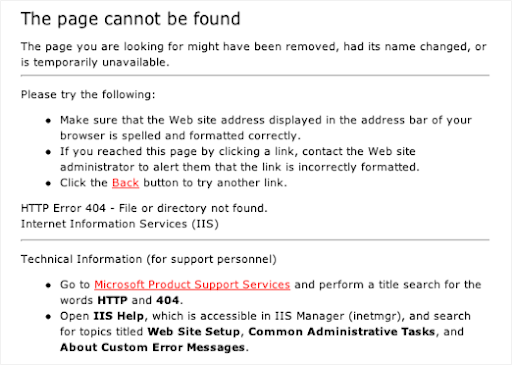
Isn’t it annoying? You were looking forward to some relevant information by clicking on the link, instead all you get is “page not found” message. Such links are referred to as broken links.
Almost all WordPress websites have a few broken links now and then, and these few rarely create havoc. However, there are reasons to avoid excess 404 errors on your website.
Here are a few reasons why broken links must be fixed:
- Broken Links Can Pull Down SEO Rankings
Search engines rank websites by crawling web pages and their links. And if there are broken or dead links on your webpages, it will stop the bots from crawling your website. This will ultimately lead to the pages and links not getting indexed. - Broken Links Repel Visitors
A visitor clicks on a potential great link hoping to find some information, but gets a 404 error instead. No points for guessing, they will get annoyed and decide to come back to the website again. This can affect your website traffic and conversion rates. It is worth it to fix those broken links.
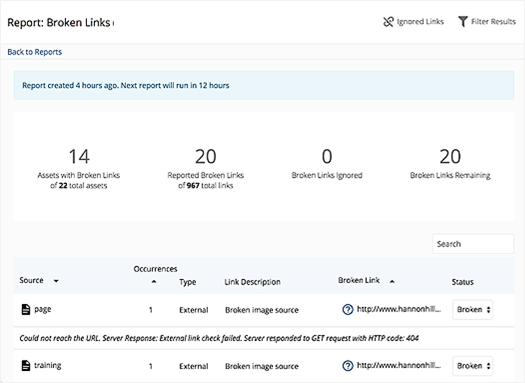
WordPress broken link detecting plugins can easily check for broken links which you can fix accordingly – remove or replace them.
Wrapping Up
It might sound harsh but if your WordPress website doesn’t appear on the first page of relevant search results, it might as well be invisible. Luckily, following simple WordPress SEO tips can boost your rankings on search engines drastically.
Here patience is the key. By implementing each of the above tips, you may not reach the desired top ranking instantly, but you will definitely see great improvement, for sure.
This guest post was written by Vishal Vivek, an Indian serial entrepreneur. He is founder of SEO Corporation. The Times Group has recognized him as a legendary entrepreneur and published his biography in the book, I Did IT (Vol 2) when he was 30.