
The Foolproof Guide to SEO Keyword Research

keyword_research_blue.jpg

Keywords are the words or phrases that pop up frequently on a web page, article, or blog post. These are the keywords that are typed in by the person searching for some specific information. The web pages, articles, and blog posts that contain the specific keyword(s) or keyword phrases appear in the search results. But getting your website or blog to rank higher for specific keywords is the real challenge that’s faced by many business owners and marketers.

While Google has historically kept marketers and SEO experts on their toes by regularly releasing updates to its search algorithm, the one thing that has remained consistent in its importance is: keyword research.

Make a List

Before you can start using keywords, you will need to carry out keyword research. For that, you will have to make a list of the most targeted and relevant keywords based on your business, services, or products.

To start this process, think about the specific topics that you want to rank higher for on the search engines. Generally, you will come up with quite a few key terms that are relevant to your business. If you already have a large website or a blog, then these will be the topics that you have more information about on your website or blog.

If you are planning to create a website or start a blog, then the keywords or keyword phrases should be relevant to the product or service you provide or the topics that come up in sales conversations.

Make Good Use of the Tools Available

Before you decide to use SEO, you are going to need a plan of action. The good news is there are many tools that you can use to find the keywords that will get more traffic to your website. One of the best tools out there for SEO is by, of course, Google. Yes, we are talking about the Google Keyword Planner.

To get started with this tool, all you have to do is create your Google Ads account, which iis easy if you already have a Google account.
google_ads_chart.png

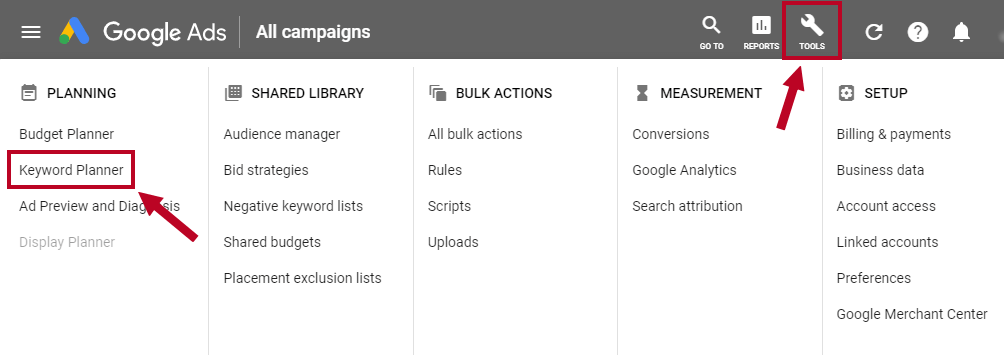
Once you’ve signed up, click on tools and Keyword Planner. Click on ‘Find new keywords’ and enter in the keyword you want to target to get all the available options.

Choose the Right Keywords

You’re going to get many suggestions from keyword research tools – as such, you will have to choose the right keywords. These are going to be the keywords that will be most relevant to your business, services and niche. When choosing the right keywords or keyword phrases, it is important to remember that you do not need to use only the exact keywords.

Since keyword search tools or generators are likely to display hundreds of “relevant” keywords in their results, you do not want to go with the brain dump of keywords that may or may not attract potential customers or Google’s algorithm. If you do not want to go through the process of curating keywords that are relevant to your business, then you can always hire professional blog writing services who will not only write the content for you but can also carry out extensive SEO keyword research.

Understanding Intent

Intent plays a major role in SEO keyword research. In fact, it wouldn’t be wrong to say that user intent has become a crucial factor when it comes to search engines and SEO. The reason why user intent is pivotal to SEO keyword research is because the consumer of today has grown more demanding. They want their problems solved at a moment’s notice, and to do that, they want to get the answers to their questions.

Similarly, the keywords that you target during your SEO keyword research should factor in the intent of the searcher, as in, what problem does the searcher want to solve when carrying out a search? Are they looking for a product or service in particular? Or do they just want information on a particular topic?

When choosing a list of keywords that you want to target, it pays to include different keywords that are relevant to the multiple intents of the searcher, and more importantly, how those keywords are going to be interpreted by the searcher. For that, it is important to create a customer persona by putting yourself in the shoes of all those who are more likely to search for your brand and relevant services you provide.

For instance, if you use the keyword phrase “content writing services.” The word “content” can mean web pages, blogs, articles, social media posts, and so on. To target your customers, you will need to include all of the relevant keywords as part of your SEO strategy so that your website will appear for more targeted keywords being searched on Google or other search engines.

Factors to Consider when Choosing Keywords

The three main factors to consider when choosing keywords are:

Authority

It is a known fact that Google leans towards sources that it deems to be more authoritative on a particular subject or niche. This means, now more than ever, business owners and content creators need to grow into an authoritative resource where people can get relevant and credible information. This is why, along with SEO, other factors to consider include backlinks and social signals. But, it all comes down to the quality of the content you create, and not just the keywords. Quality content is more likely to be shared on social platforms and have a higher chance of creating more back linking opportunities.

Relevance

Google ranks websites based on relevance. This means that your content is only going to rank of a keyword if it meets the needs of the searcher. In short, your content needs to be the best resource for that specific query or keyword.

Volume

Aiming to rank for the first spot on the SERPs for a specific keyword is not the only challenge. If no one is going to search for that term, you are less likely to generate any traffic for your website. The volume of any keyword or keyword phrase is measured by the monthly search volume. This is the number of times that a specific keyword is searched for in a month.

There are many tools such as Google Analytics, Ubersuggest, SEMrush, Ahrefs, and so on that provide you with this crucial information so that you target the right keywords during your SEO keyword research.

Ending Note

At the end of your SEO keyword research, you should have compiled a list of specific and long-form keywords that you will target by creating content around those keywords and keyword phrases for your website or blog post.

This guest article was written by Dave Brown, a professional search engine optimization specialist and content writer who manages a team of search engine optimization experts and also offers content writing services.

5 Design Principles to Help Convert Customers

fall-web-design-trends1-2000x1200.jpg

Great website design does much more than look good. There are design rules that guide how a website should look and function in order to convert users into customers. By making small but important design changes, you could see your metric counter jump. But what are these design principles?

What keeps customers coming back?

Think for a moment of the last e-commerce website that you purchased from. And now think of another website that you spent some time on. What was it about these sites that kept you there?

Undoubtedly, it could have been the content, its authority and relevance to what you were looking for at the time. If you bought something, you may have been enticed by an offer or considered the price point competitive.

Underlying all these actions was the web design itself. Those call to action buttons that had you ‘buying now’ or ‘learning more’. The graphics that subtly drew your attention to an area on the page that had the information you needed…

There are so many design factors that come into play they are almost too numerous to mention. It is true to say that poor web design is off-putting and could be the reason why your bounce rate is high.

Small changes will have a big impact. But what design principles are you looking at?

1. How easy and simple is the navigation of your website?

On one hand, a different design can buck a trend; making your website the standout site amongst a sea of competitors.

But if the design and style itself are different and trailblazing, there needs to be a clear route that users will follow. This is true whether your site is an e-commerce one or whether you sell services by people signing up for more information.

In fact, three-quarters of your users will confirm this as they say when it comes to website design, they want to be able to find what they want quickly and easily. How easy and simple is the navigation on your website?

Usability is key web design principle. Test the usability of your site as well as taking a closer look at the analytics of different pages. Are people being asked to travel through too many pages to get to the main point of the website?

2. How predictable is the layout of your website?

Following on closely to usability and function is the practical aspect of your website. We are creatures of habit and as much as we may fight against being predictable, the truth is, your website users are looking for a predictable layout.

The shape of your website is important. Cluttering it with widgets that no one uses or wants pushes your users away.

We often mistake website style for design, although there is a subtle difference between them. For example, you can have a minimal, cutting edge design that bucks the style trend within your industry but, your users still want to be able to move around your site and find things where they expect to find them.

For example, the norm is to land on the home page, a catch-all page that acts as a signpost to the rest of your site. Landing on the contact page is nonsensical.
If your website is large with thousands of products, the expectation is that there will be a search box, because who wants to spend time trawling through product after product for the one that they want?

Functionality and predictability are two design principles that should not be forgotten. Are you tweaking your website as it grows or to meet the demands of your users?

3. Are you using graphics and images as visual clues?

Images and graphics on your website are an important channel of communication. Images trigger emotions – sometimes good ones, and sometimes no-so-good – and that’s why it is important to:

a. Have images on your website and
b. Have the right images on your website

Again, like text and call to actions, where they are placed is also important. Many rules govern the use of graphics, backed by a wide field of study and research.

For example, research has found that using images of real people is an emotional trigger, especially if they have a happy, smiling face. The direction in which the person is facing is important too. If they are looking away from your content, people’s eyes track in that direction. And so, flipping an image so their head or eyeline is directed at a box of content means users will look in the same direction.

Poor quality pixelated graphics are a no-no. And stay away from poor quality stock images too.

Good quality images are essential. This isn’t just reproduction quality on your website but the content and style of the image. Consider if your images are supporting content or detracting from it?

4. How well do the colours on your website work?

This ties in with predictability in many ways, but is an important trust signal to buyers and users. However, when the style and colour change from one product to the next, they become suspicious that this isn’t a well-run website.

The same is true when there is a change in design or colour scheme within the same product.

As your website grows and your business does, there will be changes and tweaks made. When these happen, you need to take the time to make sure that they are applied uniformly across the website. If there is a stylistic update for a product, for example, and it appears on more than one page, the changes need to be applied across all pages.

Consistency in colours and branding is key so that as people move through pages they are receiving the same stylistic message on each. When colours vary, the website starts to look cluttered and won’t be meeting the expectations of users.

5. Is your website mobile-optimised?

51% of the 3.7 billion internet users across the globe access the internet via their mobile. The expectations of users when they visit your site, whether on a desktop or mobile, is that they have all functions open to them. If your website looks radically different in its mobile version, and it affects layout, architecture and function, you may find that your bounce rate metric pays the price.

Modern web design and hosting platforms can produce a mobile version of your website but don’t rely on it fully. Editing your website within the mobile setting will create a version that is responsive and enticing to users.

Frictionless mobile design is key to converting users on mobile. How well adapted is your website?

There are many website design principles, but get these five right on your website, and your conversion tracker will spring into life.